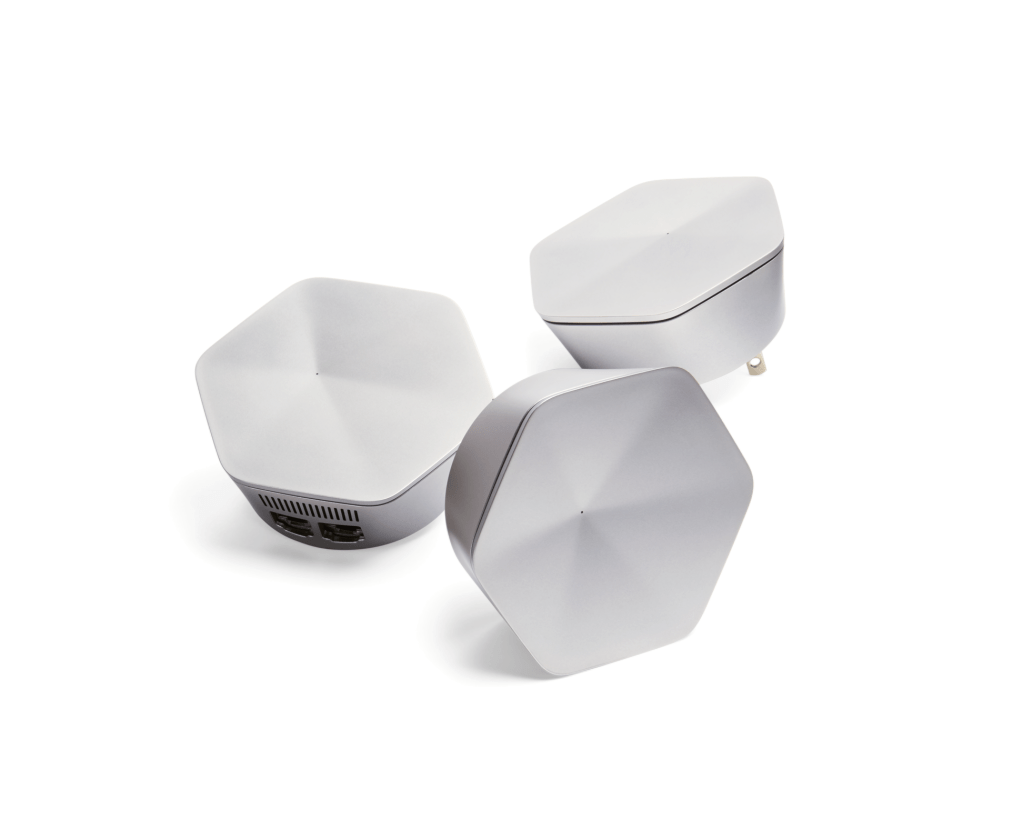
Recently, I got an opportunity to test the performance of Wi-Fi mesh pods in my humble two-storied Dutch ‘hoekhuis’ built in 1908. We got two workplaces in our home, one in the living room (ground floor) and the other upstairs in our study room (1st floor). Our house has wooden flooring, concrete outer walls, and plastered inner walls. Having good quality video calls from the study room has become critical with the COVID-19 pandemic forcing us to continuously work from home. Throughput test results always showed ‘good’ Wi-Fi coverage in our house. I measured around 90 Mbps throughput on the first floor and about 150 Mbps on the ground floor.
One can assume these speeds are more than enough to have good quality, uninterrupted Webex/Zoom/WhatsApp calls in our home, right? That did not turn out to be the case, as I was daily chastised by my wife to ‘do something’ about improving the Wi-Fi on the first-floor workspace.
Feeling responsible to fix the issues and shine as a Wi-Fi expert in our home, I went about solving the problem by setting different SSID’S for the 2.4/5 GHz band; moving the single AP in the living room to a no obstruction zone, and adding a repeater. None of these solutions provided a permanent solution as compared to adding two Wi-Fi pods in my house.
Having our laptops connect to Wi-Fi pods has minimized video outages and audio call drops. Overall, it made our home Wi-Fi more stable and predictable. I really wanted to understand how these Wi-Fi pods improved our home’s Wi-Fi performance, as I was already measuring decent throughput on the first floor. I decided to do some tests and collect some data to understand the performance benefits.
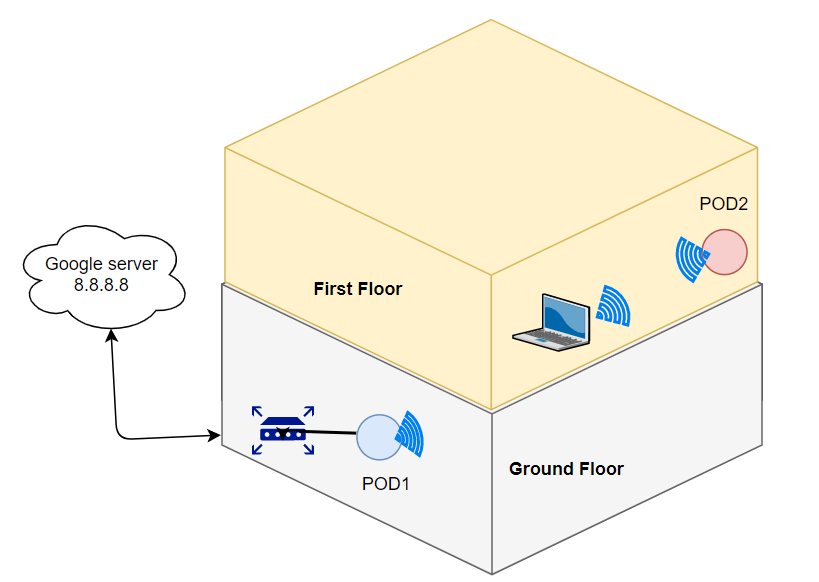
For the tests, I moved away from throughput testing and have focused on testing other Wi-Fi Quality of Service parameters like latency, packet loss, and jitter. I connected POD1 to my router via Ethernet, which was placed very close to the router (50 cm). POD2 was placed in our First-floor study room. A laptop in the study room connected wirelessly to the POD2. From the laptop, I ran a ping latency test to the Google server (8.8.8.8) for a day and collected the logs with no PODS active (AP only data in graphs below) and with POD1/2(PODS data in graphs below)
The Wi-Fi channel, link data rate, and RSSI reported by the laptop were as follows.
| AP only | With AP mesh system (PODS) |
| Channel 44 | Channel 44 |
| PHY rate: 150 Mbps | PHY rate: 300 Mbps |
| RSSI: -70 dBm | RSSI: -55 dBm |
Test 1- 24 hours ping latency from laptop to google server
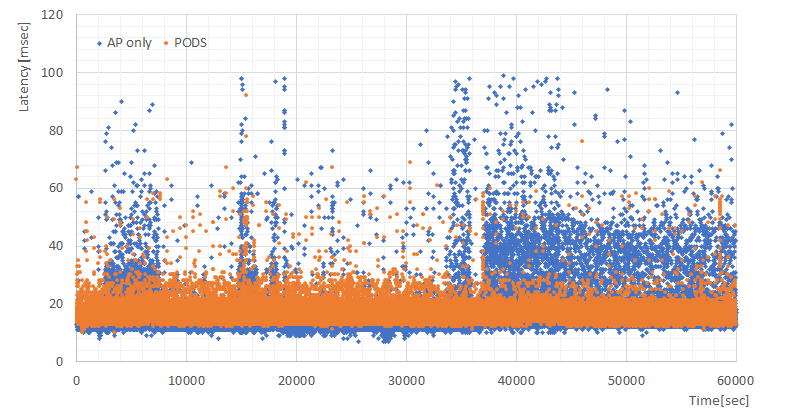
The graph shows ping latency measured every second for 60000 seconds (i.e. 1000 minutes which is almost a day). One can observe the larger spread of latency measurements for the ‘AP only‘ test (upto 100 msec latency). With PODS, latency distribution was more consistent and below 60 msec (peak).
Test 2- 24 hours 20 Mbps UDP uplink test from Laptop to the router
UDP logs give invaluable data like throughput variation, jitter and packet loss over time. I have plotted all three below.
UDP throughput variation
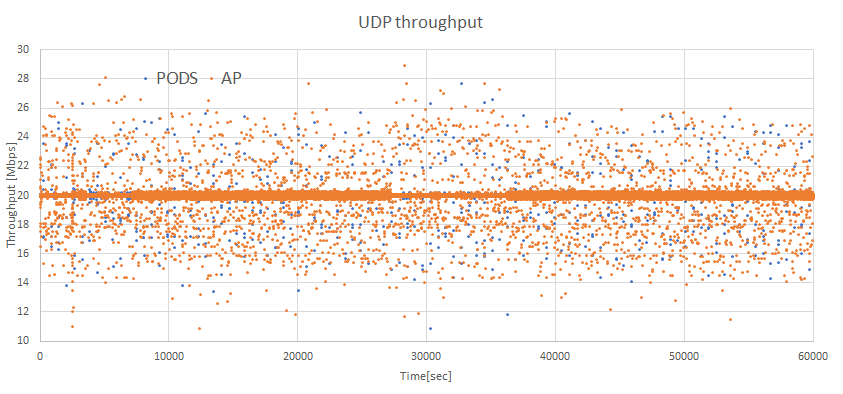
AP only results show a higher spread frequency than PODS around the 20 Mbps UDP throughput.
Jitter Deviation measurements
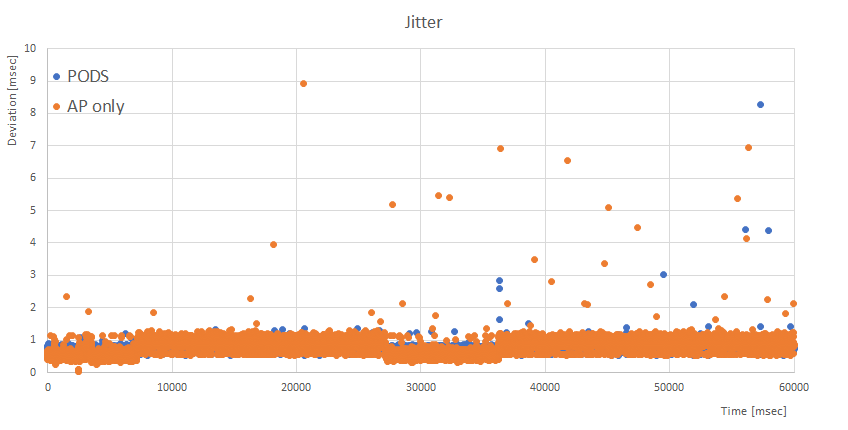
AP only measurements show many more occasions when jitter deviation is larger than PODS scenario.
Packet loss measurements
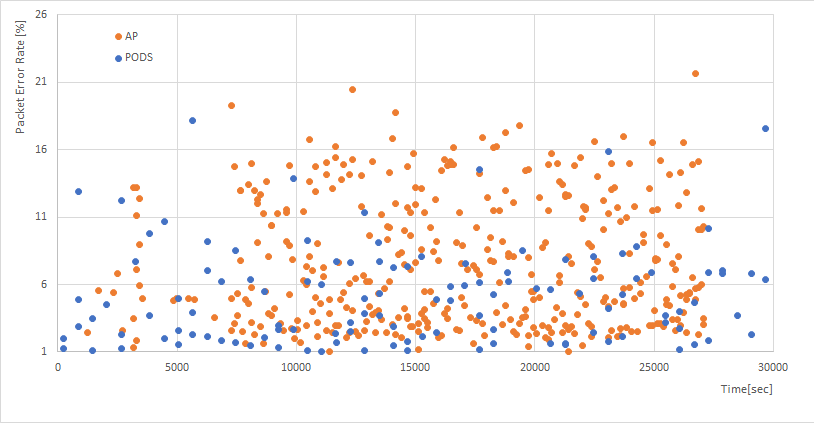
The packet loss graphs also show that AP only tests have many occasions when packet loss is higher than with PODS.
What I understood from these tests
Wi-Fi Pods help in improving PHY/MAC level performance of medium-far away Wi-Fi clients by reducing the airtime in sending/receiving data packets as compared to single AP systems. Also, Wi-Fi pods helped our 1st floor Wi-Fi link to reduce the airtime spent in doing retries in case of link impairments (i.e. neighbor interference, channel fading and reflections due to obstructions in our house). This led to lower latency, jitter and Packet loss.
Wi-Fi mesh systems not only extend Wi-Fi range in your home, but also improves the stability of the Wi-Fi link. I do recommend buying these Wi-Fi systems to have a peace of mind at your home!

 Sarodeoverwireless Consulting
Leave a comment