
Wi-Fi Protected Access 3 (WPA3) is the latest update to Wi-Fi security supported by some Wi-Fi5 and all Wi-Fi6, Wi-Fi7 certified devices. Unlike mere version updates, WPA3 emerges after a 15-year tenure of WPA2, addressing inherent vulnerabilities well-known within the networking industry. WPA2 is vulnerable to dictionary attacks, brute force attacks, and the most famous-Key reinstallation attack (KRACK). WPA3 is not backward compatible to WPA2, as its implements a Diffie- Hellman based Simultaneous Authentication of Equal (SAE) step after the well known 4 way handshake.
This poses a great challenge for adoption of WPA3, especially in the residential Wi-Fi segment as every home tends to have a mix of Wi-Fi devices with WPA(yes, some printers still use it!) and WPA2 security. Your new phone or laptop would support WPA3 but you your Smart TV, Wi-Fi speakers, gaming consoles and smart home appliances are still on the decade all WPA2 security. Along with WPA3, Wi-Fi Alliance also introduced the WPA3 transition mode (WPA3-TM) which should understand both WPA2 and WPA3 authentication and Key Management (AKM) and provide backward compatibility.
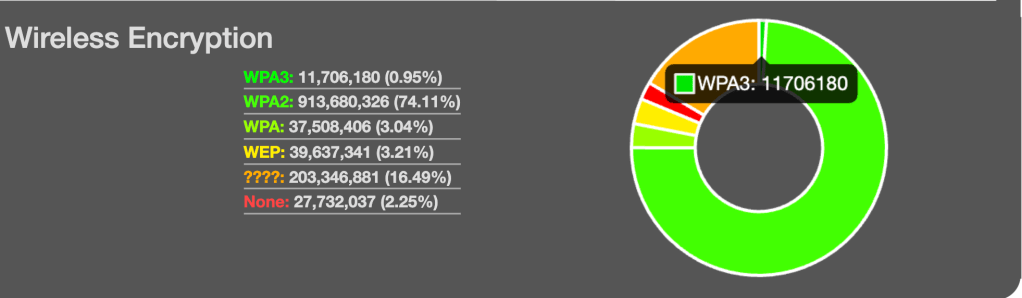
The reality is very different. Here is a look at WPA3 adoption rate measured by users around the world( 1.2 Billion unique SSID measurements)
Reference: https://wigle.net/stats
A mere 0.95% of the mapped SSIDs in the world support WPA3. One plausible reason for this low adoption rate of WPA3 security could be that Internet Service Providers (ISPs) have still not made WPA3 or WPA3-TM the default security mode in their Wi-Fi modems. Taking a look at my own ISP (Telus, Canada) network, my latest Wi-Fi 6 Apple hardware (M3) chooses WPA2 security.
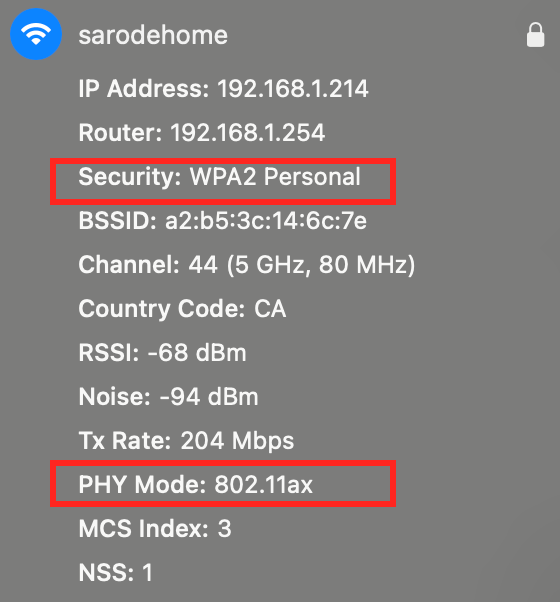
It looks like operators are wary of enabling WP3-TM as the default security mode as it was found that some legacy WPA2 only Wi-Fi clients donot connect connect to SSIDs configured in WPA3-TM. This is discussed in the awesome podcast on WPA2, WPA3-TM and WPA3 below (16:23)
So what can Operators do to enable WPA3 for its residential customers?
• Enable WPA3-TM only after requesting all major CE Wi-Fi enabled devices vendors to update their Wi-Fi drivers to be compatible with WPA3-TM.
• Assign unique SSIDs for WPA2 and WPA3 security modes.
• Identify the end device’s capability and dynamically steer the clients to the the WPA2 or WPA3 SSID.
Working from home is here to stay and it has thus become imperative for ISPs to provide a high security network to its customers. Not sure how you can go about doing this- Contact us to learn more about solutions to get your Wi-Fi networks upgraded to WPA3!

 Sarodeoverwireless Consulting
Leave a comment